Summary: in this tutorial, you will learn about SQL aliases, including table and column aliases, to make your queries shorter and more understandable.
SQL alias allows you to assign a table or a column a temporary name during the execution of a query. SQL has two types of aliases: table and column aliases.
SQL column aliases #
When designing database tables, you may use abbreviations for the column names to keep them short. For example:
- The
so_nostands for sales order number. - The
qtystands for quantity.
Or you may have to work with legacy systems that aggressively use abbreviations for naming columns and tables.
For example, SAP ERP uses abbreviations (in German) to name all the columns and tables such as VBELN for naming sales document number column.
When you use SQL to query data from these tables, the output is not obvious. To fix it, you can use column aliases that give columns temporary names during the execution of the query.
The following shows the syntax of using column aliases:
column_name AS alias_nameCode language: SQL (Structured Query Language) (sql)In this syntax, you specify the column alias after the AS keyword followed by the column name. The AS keyword is optional. So you can omit it like this:
column_name alias_nameCode language: SQL (Structured Query Language) (sql)If the alias contains spaces, you need to put it inside single quotes (or double quotes) like this:
column_name AS 'Alias Name'Code language: SQL (Structured Query Language) (sql)The following example shows how to use the column aliases:
SELECT
  inv_no AS invoice_no,
  amount,
  due_date AS 'Due date',
  cust_no 'Customer No'
FROM
  invoices;Code language: SQL (Structured Query Language) (sql)
This query has multiple column aliases:
- The
invoice_nois the column alias of theinv_nocolumn. - The
'Due date'is the column alias of thedue_datecolumn. Because the alias contains space, you have to place it inside a single quote (‘) or double quotes (“) . - The
'Customer no'is the alias of thecust_nocolumn. Note that it doesn’t have theASkeyword.
Aliases for expressions #
If a query contains expressions, you can assign column aliases to the expressions. For example:
SELECT
  first_name,
  last_name,
  salary * 1.1 AS new_salary
FROM
employees;Code language: SQL (Structured Query Language) (sql)In this example, the database will use the column aliases as the heading of the expressions in the result set.
Common mistakes of column aliases #
Since you assign aliases to columns in the SELECT clause, you can only reference the aliases in the clauses that are evaluated after the SELECT clause.
The following query will result in an error:
SELECT
  first_name,
  last_name,
  salary * 1.1 AS new_salary
FROM
  employees
WHERE
  new_salary > 5000Code language: SQL (Structured Query Language) (sql)
Error:
Unknown column 'new_salary' in 'where clause'Code language: JavaScript (javascript)Why?
In this SELECT statement, the database evaluates the clauses in the following order:
FROM > WHERE > SELECTCode language: SQL (Structured Query Language) (sql)The database evaluates the WHERE clause before the SELECT clause. Therefore, at the time it evaluates the WHERE clause, the database doesn’t have the information of the new_salary column alias. So it issued an error.
However, the following query works correctly:
SELECT
  first_name,
  last_name,
  salary * 1.1 AS new_salary
FROM
  employees
ORDER BY
new_salary;Code language: SQL (Structured Query Language) (sql)In this example, the database evaluates the clauses of the query in the following order:
FROM > SELECT > ORDER BYCode language: SQL (Structured Query Language) (sql)The database evaluates the SELECT clause before the ORDER BY clause. Therefore, at the time of evaluating the ORDER BY clause, the database has the information of the new_salary alias, which is the alias of the expression salary * 1.1. Hence, it works as expected.
SQL table aliases #
Like columns, you can assign aliases to tables. These aliases are called table aliases.
To assign an alias to a table, you use the following syntax:
table_name AS table_aliasCode language: PHP (php)In this syntax, the AS keyword is also optional. So you can omit it like the following:
table_name table_aliasCode language: SQL (Structured Query Language) (sql)Assigning an alias to a table does not rename the table permanently. It just gives the table another name temporarily during the execution of a query.
So why do you need table aliases?
When specifying the column names in the SELECT clause, you can use the following syntax:
table_name.column_nameCode language: CSS (css)In this syntax, the column has a fully qualified name that includes both table and column names. For example:
SELECT
  employees.first_name,
  employees.last_name
FROM
employees;Code language: SQL (Structured Query Language) (sql)In this example, the query selects the data from the first_name and last_name columns of the employees table. Unlike a typical query, we specify the fully qualified names for the first_name and last_name columns.
In the SELECT clause, instead of using the employees table name, you can use the table alias of the employees table. For example:
SELECT
  e.first_name,
  e.last_name
FROM
employees AS e;Code language: SQL (Structured Query Language) (sql)In this example, we assign e table alias to the employees in the FROM clause and reference it in the SELECT clause.
But why do you need to use the fully qualified names for columns?
See the following employees and departments tables from the sample database:
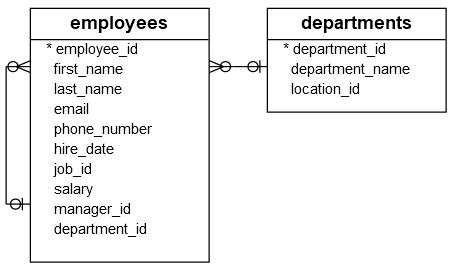
Both employees and departments tables have the columns with the same name: department_id.
When querying data from both tables, you need to specify the exact table that the department_id column belongs to. Otherwise, you’ll get an error because the database doesn’t know which table it needs to go to select data.
If you want to select data from the employees table, you can reference it in the SELECT clause as follows:
employees.department_idCode language: SQL (Structured Query Language) (sql)The same is applied to the department_id of the departments table:
departments.department_idCode language: SQL (Structured Query Language) (sql)If e and d are table aliases of the employees and departments tables, you can reference the department_id column in each table using the table aliases as follows:
e.department_id
d.department_idCode language: SQL (Structured Query Language) (sql)
In the next tutorial, you’ll learn how to use the join clauses to select data from both tables and apply the table aliases. Also, you’ll learn how to reference the same table in a single query twice using the self-join technique. In this case, you need to use the table aliases.
Summary #
- SQL has two types of aliases: column and table aliases.
- Reference the column aliases in the clauses that are evaluated after the
SELECTclause. - Use table aliases to qualify the column names.

